
There was a time when households typically had a fax machine and a dedicated fax line.
But times have changed. As more of our lives and communications have become mobile, we’ve let some of that older technology go. Some of us no longer have a land line (for fax or phone, for that matter), and many of us haven’t purchased a fax machine for years… or a decade… or more.
But the reality is, faxing is alive and well.
So sometimes we find ourselves needing to send or receive a fax, and wonder if we can do it with our latest technology.
Which is why you’re likely asking…
“Can I send and receive faxes with my Windows 10 computer?”
Well you can. And it’s easy.
To send a fax from Windows 10 (or Windows Vista or XP) all you need is your favorite email web application – such as Outlook or Gmail – and a Faxburner account.
As long as you have an internet connection you do not need a phone line or a fax modem or a fax machine. Just follow these simple steps below to send a fax straight from your Windows web browser.
How to send a fax in Windows 10
Here are the simple steps for sending a fax on your Windows 10 device:
- Sign up for a Free, Professional or Premier Faxburner account.
- Open your “Edge,” “Chrome,” “Firefox” or other preferred web browser or email client, and log in to the email account that you used to create your Faxburner account.
- Start composing an email to “send@faxburner.com”
- Type the fax number of the recipient in the subject field.
- In the body of the email, type whatever you would like included in the fax cover letter (optional).
- For the main content of the fax, attach a PDF to the email.
- Finally, click send! Faxburner will immediately convert the email body and PDF documents into a fax, and sends it to the recipient.
Congratulations, you have now sent a fax on your Windows 10 computer using Faxburner!
A confirmation of the fax will be emailed to you at the email address used to create your account.
How to receive a fax in Windows 10
Receiving a fax on your Windows 10 device is even easier.
Simply log in to your Faxburner account and click the “Reserve a Fax Number” button.
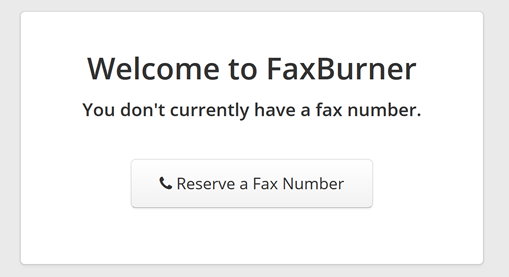
You’ll receive a 24 hour fax number with a free account, or a permanent number with a paid account.
Provide the sender with your fax number and wait for the fax to come through. An email will be sent to confirm the receipt of your fax. To read it, simply open the PDF in the email, or, log into your Faxburner account on your Windows device or smartphone. Your fax will be stored in the cloud in your account.
That’s it!
Upgrading to a Professional or Premier account provides you with a permanent fax number and the ability to send and receive hundreds or thousands of pages per month.
In addition to using your Window device, you can also send and receive faxes on your Mac, as well as your mobile device via our iPhone and Android apps.
Happy faxing!